

Establishing and Maintaining a FIX Session
The Logon [A] message initiates a connection to the Polymarket US. FIX sessions are typically initiated by customers (as opposed to the exchange platform), and can be made any time. Important: Logon [A] messages must NOT specify a SenderSubID [50] in the header. Sending this tag will cause the logon attempt to be rejected.Table 4: Logon (A) message
| Tag | Name | Req | Type | Description |
|---|---|---|---|---|
| < Standard Header > | Y | 35 = A | ||
| 98 | EncryptMethod | Y | int | Encrypted messages are not supported. 0=None |
| 108 | HeartBtInt | Y | int | A 30-second interval is recommended |
| 141 | ResetSeqNumFlag | Y | Boolean | Indicates both sides of a FIX session should reset sequence numbers back to 1 during a normal end of session (and not due to an unintended disconnect). Recommended |
| 1137 | DefaultApplVerID | Y | String | Specifies the FIX 5.0 service pack release being applied. 9=FIX50SP2 |
| < Standard Trailer > | Y |
Example 1: Logon message
Figure 1: Successful Logon
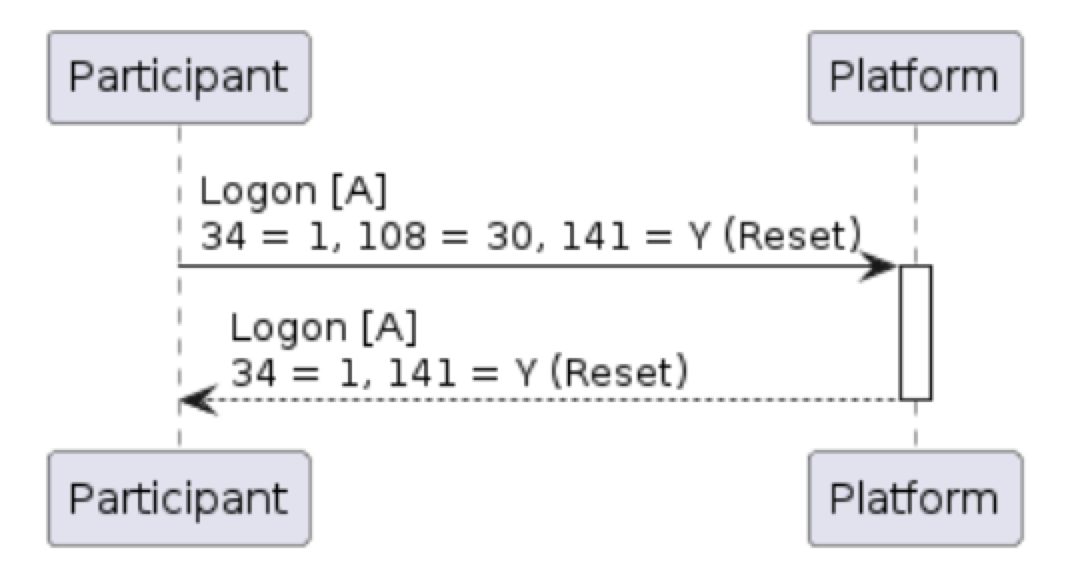 Under normal circumstances, both FIX engines on either side of the connection will regularly exchange Heartbeat messages. The frequency of such a message exchange is determined by the HeartBtInt (108) value indicated in the Logon [A] message.
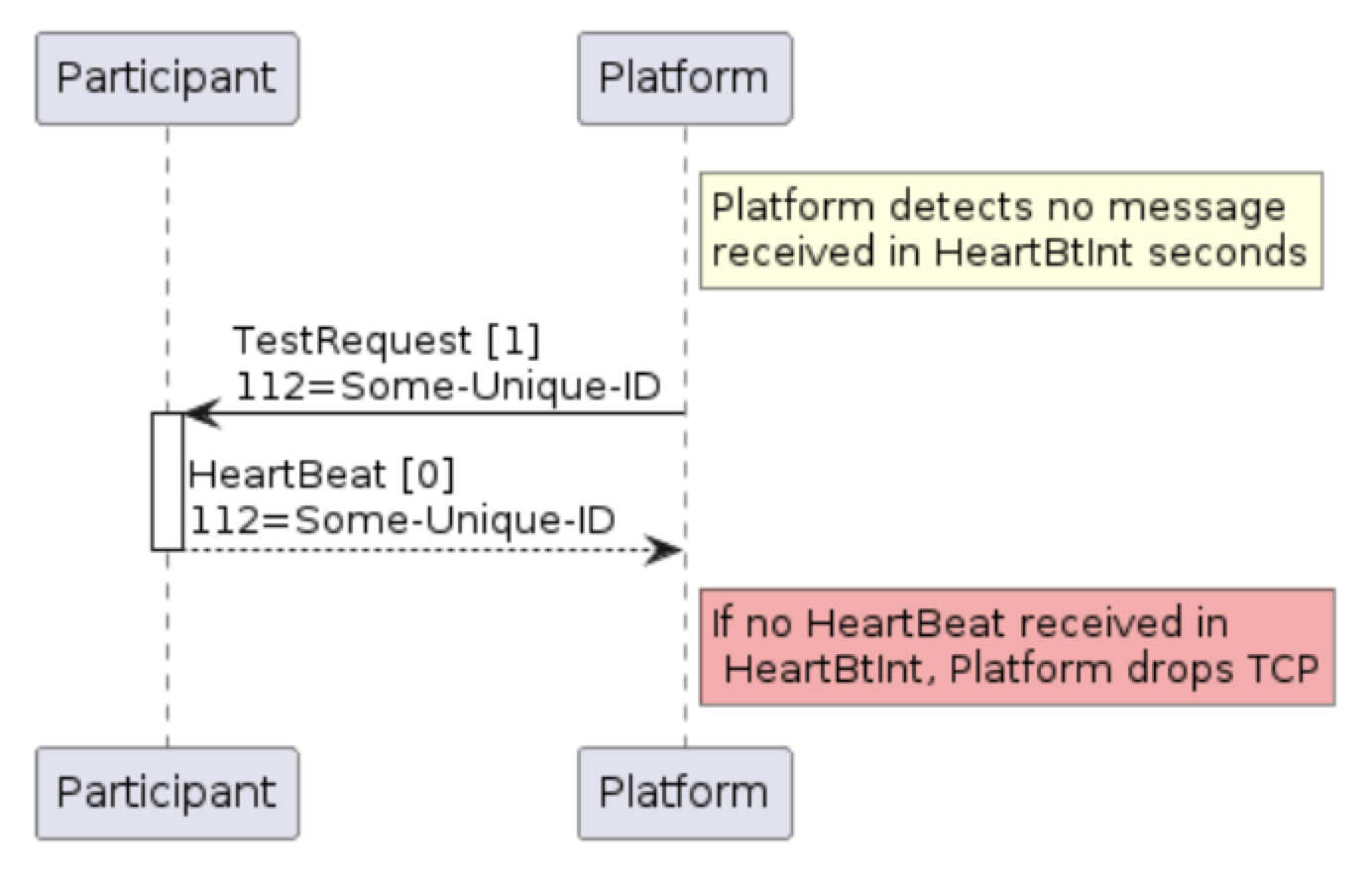
Regular application messages qualify as a heartbeat, i.e both sides of the connection are behaving nominally if a message is received during the HeartBtInt (108). If no application messages are received during the interval, the Heartbeat [0] message is used as described below.
Under normal circumstances, both FIX engines on either side of the connection will regularly exchange Heartbeat messages. The frequency of such a message exchange is determined by the HeartBtInt (108) value indicated in the Logon [A] message.
Regular application messages qualify as a heartbeat, i.e both sides of the connection are behaving nominally if a message is received during the HeartBtInt (108). If no application messages are received during the interval, the Heartbeat [0] message is used as described below.
Table 5: Heartbeat (0) message
| Tag | Name | Req | Type | Description |
|---|---|---|---|---|
| < Standard Header > | Y | 35 = 0 (zero) | ||
| 112 | TestReqID | N | String | Required when the heartbeat is the result of a TestRequest [1] message |
| < Standard Trailer > | Y |
Table 6: TestRequest (1) message
| Tag | Name | Req | Type | Description |
|---|---|---|---|---|
| < Standard Header > | Y | 35 = 1 | ||
| 112 | TestReqID | Y | String | ID to be returned in the resulting Heartbeat [0] response |
| < Standard Trailer > | Y |
Figure 2: Using TestRequest [1] to request Heartbeat [0] from other side
Cancel on Disconnect
Cancel on Disconnect cancels open (unexecuted) DAY orders when an order-entry session loses connectivity because of a network error. GTC and GTD orders continue to rest unless otherwise agreed. A network-level disconnect triggers Cancel on Disconnect in the FIX gateway. A graceful FIX logout is covered by Cancel on Logout. After reconnecting, missed messages will be replayed including execution reports for any canceled orders or in-flight fills. It is the FIX client’s responsibility to re-enter any orders cancelled by this feature, if they choose to based on market conditions when connectivity is re-established. Provisioned order-entry sessions useCancelOnDisconnect=Y and CancelOnLogout=Y unless otherwise agreed.
Cancel on Logout
Cancel on Logout cancels working DAY orders when an order-entry session logs out. It applies on a network disconnect and on a graceful logout initiated by either side. Cancel on Disconnect applies only when the session drops with no preceding FIX logout. Provisioned order-entry sessions enable both settings unless otherwise agreed. The example below shows two non-default configurations. Orders for TargetCompID=TFA cancel only on a network error (CancelOnDisconnect=Y). Orders for TargetCompID=TFB cancel on any session logout (CancelOnLogout=Y with CancelOnDisconnect=N).
Sequence Number Tracking, Recovery, and Reset
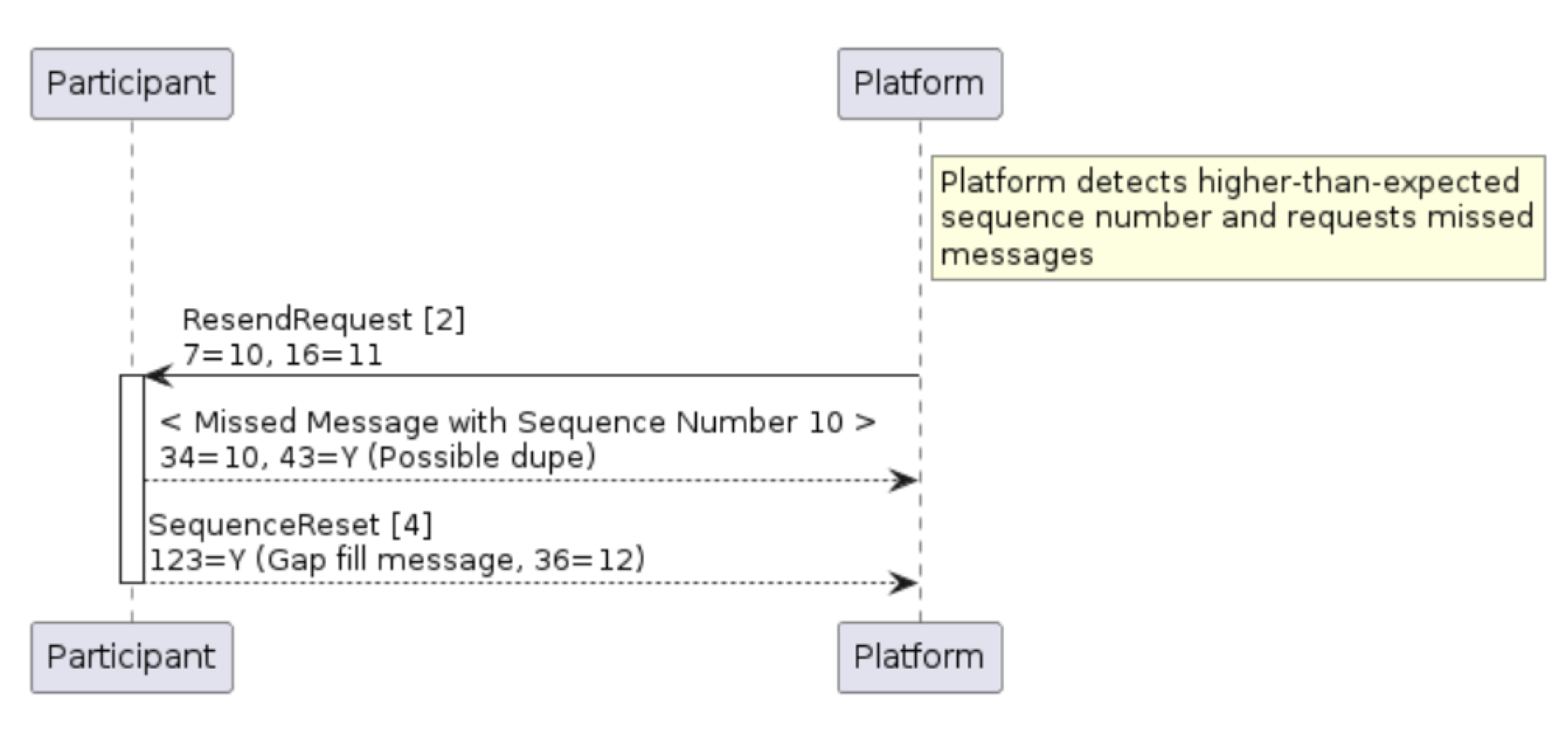
The FIX protocol uses simple, incrementing MsgSeqNum (34) values (carried in the StandardHeader of each message) to both detect and request retransmission of missed messages. Each FIX engine will maintain a simple message count of outbound and inbound messages, values which should increment by one for each message sent or received per FIX session. Should a message be received that does not match the expected sequence number given, then it is possible that one or more messages were lost. In that situation, a ResendRequest [2] message may be sent to request retransmission of a specified range of messages identified by their MsgSeqNum (34) value.Table 7: ResendRequest (2) message
| Tag | Name | Req | Type | Description |
|---|---|---|---|---|
| < Standard Header > | Y | 35 = 2 | ||
| 7 | BeginSeqNo | Y | SeqNum | MsgSeqNum (34) of first message in the range to be resent (inclusive) |
| 16 | EndSeqNo | Y | SeqNum | MsgSeqNum (34) of the last message in the range to be resent (inclusive), or “0” to request resend all messages after the indicated BeginSeqNo (7) |
| < Standard Trailer > | Y |
To request that the counterparty adjusts their internal sequence number to the indicated NewSeqNo (36) value. In this case, GapFillFlag (123) is either not present or set to “N” (no). In the message replay situation described above, to replace a FIX message which will not be re-sent. In this case, GapFillFlag (123) should be set to “Y” and the NewSeqNo (36) field will contain the next sequence number to be sent.
Table 8: SequenceReset (4) message
| Tag | Name | Req | Type | Description |
|---|---|---|---|---|
| < Standard Header > | Y | 35 = 4 | ||
| 123 | GapFillFlag | N | Boolean | Indicates that the Sequence Reset message is replacing administrative or application messages which will not be resent. |
| 36 | NewSeqNo | Y | SeqNum | New sequence number |
| < Standard Trailer > | Y |
Figure 3: ResendRequest [2] message triggers re-transmission of missed messages
Terminating a FIX Session
The Logout [5] message initiates or confirms the termination of a FIX session. Customers may log out of their FIX sessions at any time.Table 9: Logout (5) message
| Tag | Name | Req | Type | Description |
|---|---|---|---|---|
| < Standard Header > | Y | 35 = 5 | ||
| 58 | Text | N | String | Free format text string |
| < Standard Trailer > | Y |
Figure 4: Graceful Logout sequence
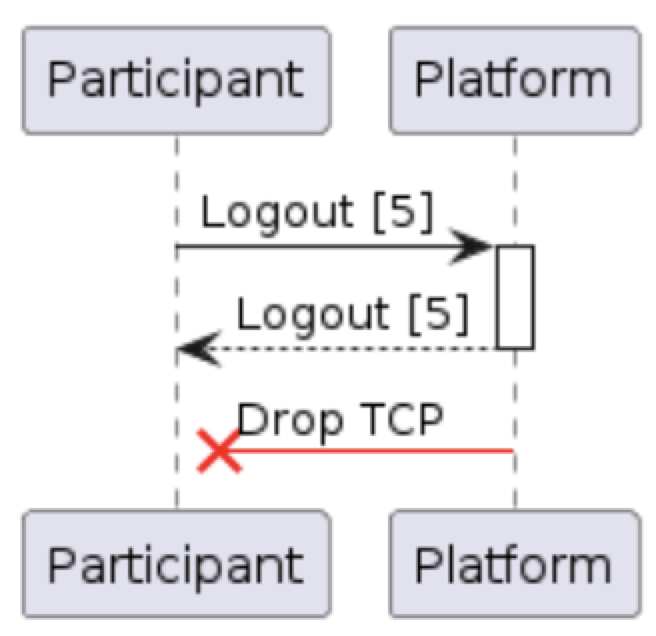 Participants are recommended to schedule a graceful logout before the start of a scheduled maintenance window. If this is not received, then the Polymarket US will initiate the logout process.
IMPORTANT: Unless otherwise agreed, provisioned order-entry sessions use Cancel on Disconnect and Cancel on Logout. Open (unexecuted) DAY orders are canceled when an order-entry session disconnects or logs out. GTC and GTD orders continue to rest.
Participants are recommended to schedule a graceful logout before the start of a scheduled maintenance window. If this is not received, then the Polymarket US will initiate the logout process.
IMPORTANT: Unless otherwise agreed, provisioned order-entry sessions use Cancel on Disconnect and Cancel on Logout. Open (unexecuted) DAY orders are canceled when an order-entry session disconnects or logs out. GTC and GTD orders continue to rest.
General Error Handling
Most transactional messages in FIX are rejected using an application-level message (as described in various sections which follow). In the event that one of these messages can not be used to reject a message, however, then the Polymarket US may return either a Reject [3] message, or a BusinessMessageReject [j] message as described below.Reject [3] messages are commonly used to reject messages where the message type is known, but there is something syntactically wrong with its content (e.g. incorrect repeating group). BusinessMessageReject [j] is a more generic message used to reject errors such as unsupported message type or malformed messages.
Table 10: Reject (3) message
| Tag | Name | Req | Type | Description |
|---|---|---|---|---|
| < Standard Header > | Y | 35 = 3 | ||
| 45 | RefSeqNum | Y | SeqNum | The message sequence number being rejected |
| 371 | RefTagID | N | int | The tag (field) number being rejected |
| 373 | SessionRejectReason | N | int | Reason for the rejection. 0=Invalid tag number, 1=Required tag missing, 2=Tag not defined for this message type, 3=Undefined tag, 4=Tag specified without value, 5=Value is incorrect, 6=Incorrect data format for value, 9=CompID problem, 10=SendingTime accuracy problem, 11=Invalid MsgType, 13=Tag appears more than once, 14=Tag specified out of required order, 15=Repeating group fields out of order, 16=Incorrect NumInGroup count, 99=Other |
| 58 | Text | N | String | Optional string to further describe the error |
| < Standard Trailer > | Y |
Example 3: Reject [3] example due to bad limit price
Table 11: BusinessMessageReject (j) message
| Tag | Name | Req | Type | Description |
|---|---|---|---|---|
| < Standard Header > | Y | 35 = j | ||
| 45 | RefSeqNum | N | SeqNum | The message sequence number being rejected |
| 58 | Text | N | String | String to further describe the error |
| 372 | RefMsgType | Y | String | The MsgType being rejected |
| 379 | BusinessRejectRefID | N | String | When a FIX gateway rejects a message with a BusinessMessageReject, it provides tag 379 (BusinessRejectRefID) on the BusinessMessageReject and populates it with the ClOrdId or MDReqID to allow FIX clients to quickly determine which message was rejected. |
| 380 | BusinessRejectReason | Y | int | The reason for the rejection. 0=Other, 1=Unknown ID, 2=Unknown Security, 3=Unsupported Message Type, 4=Application Not Available (downtime), 5=Conditionally required field missing, 6=Not authorized, 18=Invalid price increment (tick size) |
| < Standard Trailer > | Y |
Example 4: BusinessMessageReject [j] example due to bad role permissions